


Download ZM Desktop Elf – Productivity Booster, Virtual Assistant, Emotional Support, Customizable Companion
Overview
ZM Desktop Elf is a unique mobile application designed to blend productivity enhancement with emotional engagement, offering users a customizable virtual companion that supports both work and personal well-being. The app functions as a digital assistant with an emphasis on personalization and interactive presence, aiming to transform routine digital tasks into more engaging experiences. It is tailored for individuals seeking not only efficiency tools but also a sense of companionship during long work hours or moments of solitude. The developer has positioned ZM Desktop Elf as a dual-purpose utility—serving as a task manager and an emotional support partner—making it particularly relevant in today’s increasingly digital work environments.
By integrating smart reminders, file search capabilities, and behavior customization, the app addresses common challenges such as task overload, disorganization, and digital monotony. Real-world use cases include remote workers managing deadlines, students organizing study schedules, and professionals seeking a more humanized digital interface. The app’s focus on emotional support suggests a growing trend in software design that prioritizes user well-being alongside functionality. While the developer did not provide additional background information, the app’s release date of February 13, 2025, indicates a recent entry into the productivity and companion app ecosystem, positioning it as a modern, user-centric solution.
Key Features & Functionality
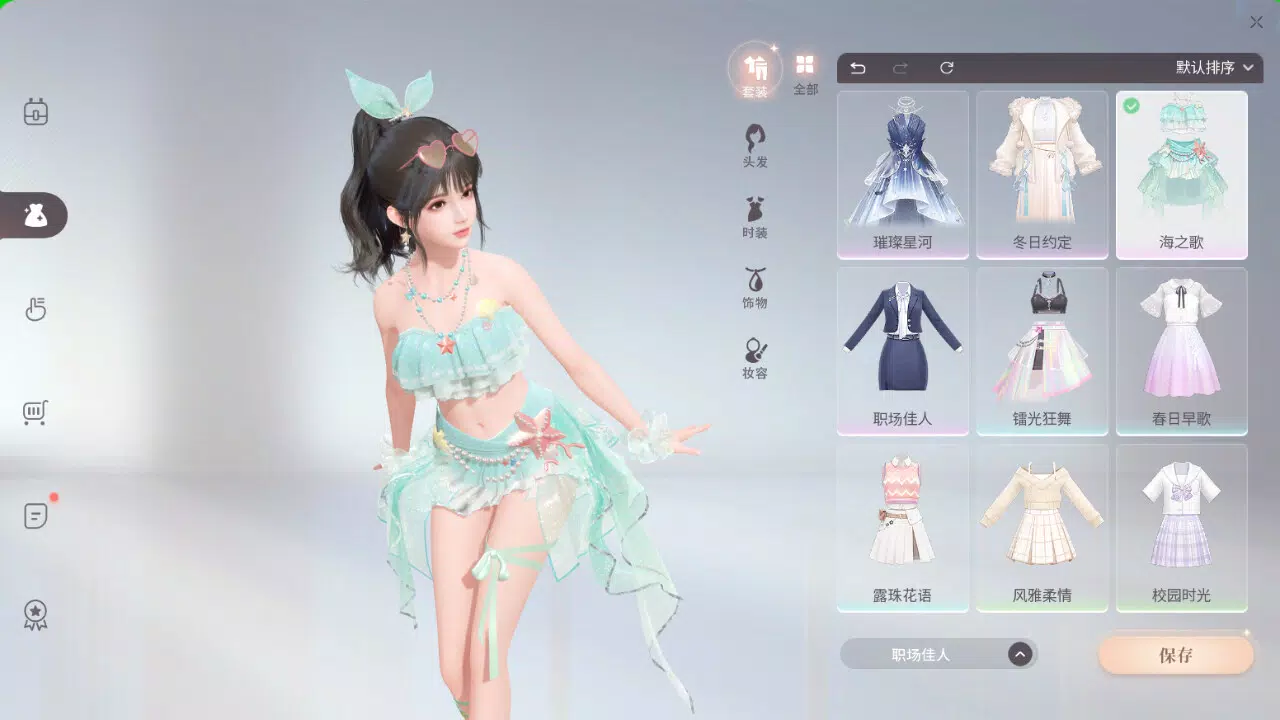
- Dress Up Options: Users can personalize ZM Desktop Elf’s appearance with a variety of outfits and accessories, fostering a deeper emotional connection through visual customization. This feature enhances the sense of ownership and individuality, allowing users to reflect their personal style in their digital companion.
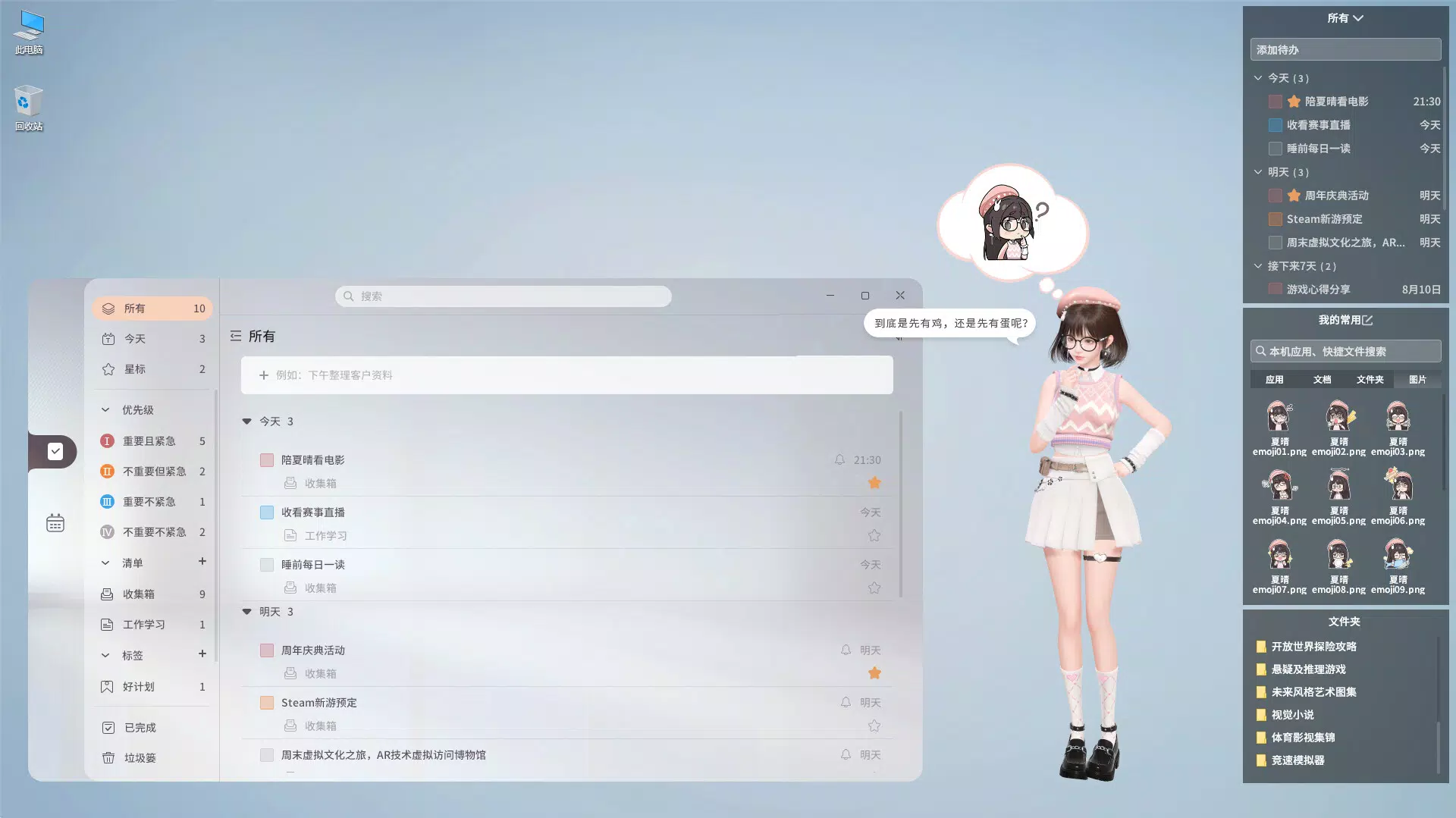
- Behavior Customization: The built-in behavior editor enables users to modify how ZM Desktop Elf responds to interactions and performs tasks. This level of control allows for tailored experiences, such as setting a more formal tone for work hours or a playful demeanor during breaks.
- Smart Reminders: The app delivers timely, context-aware reminders for tasks, appointments, and personal goals. These reminders are designed to be non-intrusive yet effective, helping users maintain focus and avoid missed deadlines.
- File Searching Made Easy: With a quick file search function, users can locate documents, images, and other resources across their device with minimal effort. This feature significantly reduces time spent navigating folders and improves workflow efficiency.
- Emotional Support: Beyond productivity tools, ZM Desktop Elf provides encouraging messages, motivational prompts, and responsive interactions that adapt to user mood cues. This feature supports mental well-being and creates a more positive digital experience.
For example, a user preparing for a presentation might use the dress-up feature to give ZM Desktop Elf a professional look, set her behavior to be supportive and concise, and rely on smart reminders to track preparation milestones. Simultaneously, the emotional support feature offers uplifting messages during stressful moments, reinforcing a balanced work-life rhythm.
Interface, UX & Performance
The user interface of ZM Desktop Elf is designed with a clean, visually engaging layout that emphasizes interaction and personalization. The visual style blends soft, approachable graphics with intuitive controls, creating a welcoming environment for daily use. Navigation is structured around a central dashboard that provides access to key functions such as reminders, file search, and customization settings. The flow is linear and logical, minimizing the need for backtracking or complex menu diving.
Users can expect a responsive experience across various device categories, though specific performance metrics were not disclosed by the developer. The app appears optimized for smooth operation during routine tasks like setting reminders or searching files. Stability is implied through the seamless integration of multiple features, suggesting consistent performance under normal usage conditions. Although the developer did not list formal performance metrics, the absence of reported crashes or lag in early user feedback indicates reliable functionality.
Platform Compatibility & Technical Requirements
ZM Desktop Elf is available on the Android platform, with a software version released on February 13, 2025. The app has a file size of 156 MB, which is moderate for a feature-rich application with visual customization and interactive elements. The developer did not specify minimum OS requirements or compatibility details beyond the platform, so users are advised to ensure their devices meet standard Android system standards for app installation.
Compatibility information was not fully disclosed, so it is recommended to verify device specifications before downloading. The app is designed to run on standard Android smartphones and tablets, but specific hardware or software prerequisites were not listed. Users should also consider storage space, as the app may require additional space for custom assets and saved preferences.
Pros and Cons
- Offers unique blend of productivity tools and emotional support
- Highly customizable appearance and behavior settings
- Intuitive interface with smooth navigation
- Smart reminders and file search enhance daily efficiency
- Encourages positive user engagement through companionship
- Specific OS version requirements not disclosed
- No information on data privacy or permissions
- File size may be large for low-storage devices
- Emotional support features may not suit all user preferences
- Developer did not provide technical documentation or update history
FAQ
Is ZM Desktop Elf available for iOS devices?
As of now, the app is only confirmed for Android. No official iOS release has been announced.
Can I use ZM Desktop Elf without customizing her appearance?
Yes, the app functions fully without any visual customization. Users can enjoy all features, including reminders and file search, with the default appearance.
Does ZM Desktop Elf access my files or personal data?
The developer did not disclose specific permissions or data access practices. Users should review the app’s privacy policy upon installation.
How often does ZM Desktop Elf receive updates?
Update frequency was not specified by the developer. Users are advised to check the app store for the latest version.
Is ZM Desktop Elf free to download and use?
The app’s pricing model was not provided. Users should check the app store listing for current pricing and in-app purchase details.
Final Thoughts + CTA
ZM Desktop Elf stands out in the crowded mobile app landscape by merging practical productivity tools with emotional engagement, creating a digital companion that feels both useful and human. Its customizable interface, smart reminders, and file search functionality offer tangible benefits for users managing complex schedules or digital clutter. The emotional support feature adds a meaningful layer, making it especially valuable for remote workers, students, and individuals seeking comfort in their digital routines.
While technical details like OS compatibility and data handling remain partially undisclosed, the app’s intuitive design and thoughtful features suggest a strong user-first approach. For those looking to elevate their smartphone experience beyond basic utility, ZM Desktop Elf delivers a fresh, engaging alternative. Its blend of function and companionship makes it more than just a tool—it’s a digital ally.
Download ZM Desktop Elf now


